
The challenge with AI content at scale isn't generating posts - any LLM can do that. The challenge is producing 100+ assets per week across multiple clients, multiple formats, and multiple channels without the output drifting into generic AI slop. That requires a pipeline: brand voices, content characters, knowledge bases, blueprint templates, batch dispatch, and a publish queue that routes finished content to the right channel automatically. Most agencies are still generating one post at a time and wondering why it doesn't scale.
Short answer: AI content at scale means a system, not just a tool. The system has three layers: a brand library (voices, characters, knowledge base), a production layer (blueprints that define what to generate and how), and a distribution layer (batch dispatch plus a publish queue that routes output to channels automatically). Without all three layers, you're running manual content production with an AI copilot - not a content engine.
The Gap Between One Post and Real Scale
Most AI content tools are one-shot: type a prompt, get a post, copy and paste it somewhere. That works for a solo founder writing their own LinkedIn content. It does not work for an agency managing 10 clients across LinkedIn, email, Instagram, and WhatsApp simultaneously.
The moment you add a second client, the problems start: whose brand voice goes into this prompt? Which ICP profile should this post address? Does this client's knowledge base say anything about this topic that should inform the output? If you're answering those questions manually for every piece of content, you're not running AI content at scale - you're running a human-in-the-loop operation with AI assistance.
Real scale means the AI can answer those questions itself. It pulls the correct brand voice, the right character, the relevant knowledge base context, and the appropriate ICP target because those are structured inputs that live in a library - not things you re-type into a prompt every time. In our experience building AI content systems for agencies, Cedric's work running these pipelines for operators shows the library layer is what separates agencies producing 20 assets per week from agencies producing 200.
The other gap is format diversity. One client might need a LinkedIn article, a three-email nurture sequence, a short-form video script, and an Instagram caption from the same brief. If those all require separate prompts and separate tools, your operations team spends more time coordinating than creating. A multi-format pipeline - where one brief generates all four outputs automatically - is what makes multi-format AI content production viable at agency volume.
Blueprint Templates: The Foundation Layer
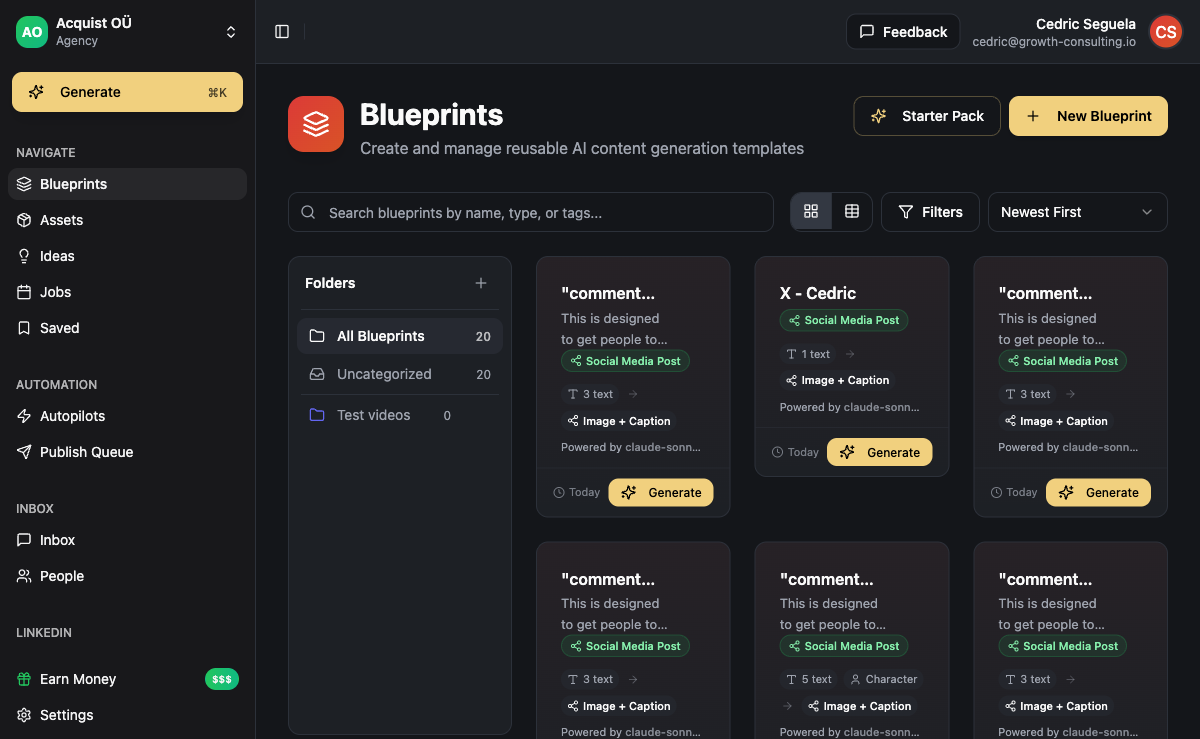
Content blueprint: A reusable template that defines what to generate and how. A blueprint references the brand library (which voice, which character, which knowledge base, which ICP) and specifies the output formats required (text, image, video, audio) and the topic or content prompt to run. Every generation job is created from a blueprint. The blueprint is the standing instruction set - configure it once, then dispatch jobs against it as many times as needed, with or without human input each time.
The reason blueprints matter for scale is repeatability. Without a blueprint, every generation job is improvised - someone writes a prompt, chooses settings, selects outputs, and dispatches. With a blueprint, all of that is stored. A weekly LinkedIn article for a client about AI sales becomes one dispatch click, not ten minutes of configuration every Monday.
For agencies, blueprints map to client deliverables. A client who needs five LinkedIn posts per week, one email newsletter, and three short-form video scripts gets three blueprints: one for LinkedIn, one for email, one for video. Each blueprint knows which brand voice to use, which character presents the content, which ICP the messaging targets, and which format to output. Generating next week's content for that client means dispatching three jobs, not rebuilding the configuration from memory.
The knowledge base connection is where blueprints stop producing generic output. When a blueprint references a knowledge base, the generation pipeline retrieves relevant facts and context from that knowledge base before writing. A financial services client's blueprint pulls their regulatory context, product differentiators, and case study library. The output reads like it came from someone who knows the client's business - because it did.
Batch Dispatch: Running the Pipeline at Volume
Batch dispatch is the mechanism that breaks the single-post-at-a-time bottleneck. Instead of generating one post, reviewing it, and moving on, batch dispatch kicks off multiple generation jobs simultaneously - one per client, one per blueprint, one per content slot in the publishing calendar.
In ACA, the dispatch-generation-job function creates generation jobs from blueprints. Each job runs through the execution pipeline independently: it retrieves knowledge base context, runs the text generation stage, then triggers image, video, or audio stages depending on what the blueprint specifies. Jobs for different clients run in parallel - Client A's LinkedIn post and Client B's email sequence generate simultaneously, not sequentially.
The practical result for an agency: Monday morning, you dispatch the week's jobs for all clients. By Tuesday, the output is ready for review in each client's workspace. The review step is the bottleneck you choose to keep - the AI handles the production volume, humans handle quality approval and publish scheduling.
Compare that to a one-post-at-a-time workflow: writing one post, reviewing it, moving to the next client, repeating. At five clients with five pieces each, that's 25 separate creation sessions per week. Batch dispatch compresses that to one dispatch session and one review session per client. The time savings compound every week.
The Publish Queue: From Generated to Live
The publish queue is the distribution layer. After generation jobs complete and content passes review, the publish queue routes each piece to the correct channel - a LinkedIn post goes to LinkedIn via Unipile, an email newsletter loads into the campaign builder, a video goes to the scheduled Instagram post queue.
The queue handles scheduling too. If a client's content calendar has LinkedIn posts going out Monday, Wednesday, and Friday at 9am, and a cold email sequence launching on Tuesday, the publish queue manages that timing automatically. There is no manual copy-paste from a Google Doc into a scheduler.
For agencies managing content and outreach together, the publish queue connects directly to the campaign builder. A generated cold email sequence doesn't just land in a document - it loads into an outreach campaign with the correct sequencing, delays, and channel routing already configured. This is where outbound sales automation and AI content production merge: the content pipeline feeds the campaign pipeline directly.
Brand Voice at Scale: The Part Most Tools Get Wrong
Brand voice is the hardest part of content at scale, and most tools don't solve it at the infrastructure level. They give you a text field where you describe your brand's tone. You paste something like "we are professional but approachable, avoid jargon," and the model does its best. For one client, that mostly works. For ten clients across hundreds of pieces per week, it doesn't - the outputs drift toward a generic baseline that could belong to anyone.
The solution is to make brand voice a first-class data object, not a prompt fragment. In ACA, a brand voice is a stored configuration: writing style parameters, example content the AI learns from, forbidden phrases, and preferred formats. A character adds a persona layer: who is speaking, what their point of view is, and what topics they own. The knowledge base adds factual grounding: what the client sells, who their customers are, and what results they've achieved.
Brand voices, characters, and knowledge base - those three inputs are what produce on-brand content at volume. Not "write me a LinkedIn post about productivity." That framing is where generic output comes from. The system knows what to produce because it was told, in structured form, what the brand is.
Content revision rate at scale: In our experience working with agencies running AI content pipelines, the revision rate on first review drops significantly when brand voice, characters, and knowledge bases are configured as structured inputs rather than prompt text. Teams that configure the library properly typically approve 70-85% of generated content on first pass. Teams using generic prompts spend 2-3x longer in revision cycles per client per week. The library setup takes time once - the savings compound across every subsequent content run.
For the AI agency business model to work economically, that revision rate matters. If an account manager is spending three hours per week per client fixing AI-generated content that drifted off-brand, the margin on the content service disappears. If they're spending 30 minutes reviewing and approving, the economics are completely different. Brand voice infrastructure is what makes the difference.
How Agencies Set Up the Full Content Stack
The content-at-scale stack has three phases: setup, production, and distribution. Here is how each phase works in practice:
Phase 1 - Library setup (do once per client): Create a brand voice for each client. Define 1-3 content characters (who speaks for the brand). Build out the knowledge base with the client's product info, ICP details, case studies, and topic-specific context. This phase typically takes 2-4 hours per client. It is the investment that makes everything else fast.
Phase 2 - Blueprint creation (do once per content type): Create blueprints for each recurring content deliverable. A "LinkedIn post" blueprint, a "cold email sequence" blueprint, a "short-form video" blueprint. Each blueprint references the library (voice, character, knowledge base) and specifies output format and content prompt structure. Creating blueprints takes 20-40 minutes per content type.
Phase 3 - Production (ongoing, mostly automated): Dispatch batch jobs against blueprints each week. Review output in client workspaces. Approve and schedule into the publish queue. For a client with 10 content pieces per week, ongoing production should take under two hours per week including review - everything else runs in the pipeline.
Agencies that have set up this stack report that the bottleneck shifts from content production to content strategy. The question changes from "how do we produce enough content" to "are we producing the right content for each stage of the buyer journey." That is a much better problem to have.
If you are building this from scratch, the AI agency setup guide covers the go-to-market and service packaging side. The full AI content tool comparison helps you understand where ACA sits relative to single-format tools. Increasingly, AI automation agencies are combining content production with lead gen delivery as a single packaged service - the pipeline infrastructure is the same; the service offering just includes both layers.
Frequently Asked Questions
How many clients can one agency seat in ACA manage with AI content at scale?
There is no platform-imposed client limit. Each client gets an isolated workspace with their own brand voices, characters, knowledge bases, and blueprints. The practical limit is usually the review bandwidth of the account management team, not the platform's generation capacity. With batch dispatch and a well-configured library, one account manager can realistically oversee content production for 8-12 clients per week while keeping review time manageable.
Does AI content at scale work across different industries?
Yes, and the knowledge base is what makes it work across industries. A financial services client and a SaaS startup client produce completely different content because their knowledge bases, brand voices, and characters are different. The AI draws from each client's specific context, so outputs are differentiated by the inputs, not by the model's defaults. Agencies serving diverse client rosters benefit most from structured brand library infrastructure because it is the only way to maintain distinct voices at volume across very different industries.
What is the minimum setup required before using batch dispatch?
You need at least one brand voice and one blueprint. A brand voice takes 15-30 minutes to configure. A blueprint takes 20-40 minutes. You can technically batch dispatch with just those two inputs, though adding a knowledge base significantly improves output quality and reduces revision time. Most agencies configure the full library for a client before running their first batch - the setup investment is small relative to the ongoing time savings across a full week's content run.
How does ACA handle content that needs human review before publishing?
Generated content lands in the workspace in a review state before it enters the publish queue. Agency account managers review and approve each piece. You can approve all, approve selectively, or flag a piece for regeneration. Only approved content enters the publish queue. There is no pipeline step that auto-publishes without human approval unless you configure it that way intentionally. The review workflow is designed for a non-technical account manager to handle without touching configuration.
Can the AI content pipeline generate outreach copy alongside brand content?
Yes. Blueprints work for both brand content (LinkedIn posts, social media, newsletters) and outreach content (cold email sequences, LinkedIn connection request copy, follow-up templates). An agency can run a blueprint that generates a LinkedIn article alongside a cold email sequence using the same brand voice and ICP profile. The generated outreach copy loads directly into the campaign builder rather than the social publish queue - same pipeline, different routing at the distribution layer.