
Social media on autopilot is not about scheduling posts you wrote yourself. The version that actually saves time runs a pipeline: your brand voice and knowledge base feed a blueprint, the AI generates the post, the publish queue routes it to the right channel, and it goes live on schedule - without you writing a word per piece after the initial setup. This guide walks through how to build that pipeline in ACA, from connecting accounts and configuring brand voices to activating an Autopilot that generates and publishes content while you are working on something else.
Short answer: Social media autopilot in ACA runs three layers: a brand library (voice, knowledge base, ICP profile), a production layer (content blueprints that define what to generate and how), and a publishing layer (channel connections plus a posting schedule). Configure all three - which takes roughly 90 minutes for a new account - and the system generates, formats, and posts on your defined cadence. You review batches periodically; the pipeline handles the production volume.
Scheduling vs. Autopilot: Why the Distinction Matters
Buffer, Hootsuite, Later - these tools solve the gap between writing and publishing. You write the post, you pick the time, the tool publishes it. That is scheduling. It is useful, but it does not reduce the writing. The bottleneck for most agencies and founders is not the 10 seconds it takes to click publish. It is the 30 minutes it takes to write something worth publishing.
Scheduling is 1995. ACA generates the content too.
The difference is what sits upstream of the schedule. A scheduling tool receives finished posts and manages when they go out. ACA generates the post, formats it for the channel, routes it through a review queue if you want one, and publishes it - all from a blueprint you configure once. The human involvement shifts from "write each post" to "configure the system and review batches." Most Buffer alternatives that actually generate content focus on one channel or bolt on a generic AI writing assistant. ACA runs the generation engine across all channels from one system without separate tool subscriptions per platform.
Content autopilot (ACA definition): A system that generates, formats, queues, and publishes social content from brand configuration without per-post manual input. Inputs are defined once - brand voice, knowledge base, content pillars, output format, posting cadence. The system produces content against those inputs until configuration changes or the autopilot is paused. Distinct from scheduling, which requires a human-written post as input. The autopilot closes the loop scheduling leaves open.
The Manual Content Workflow Doesn't Scale
The manual social media workflow for one client on one platform is manageable. Draft it, review it, copy it to LinkedIn, schedule it. If you are fast, that is 25-35 minutes per post.
Multiply by 10 clients, 3 platforms each, 4 posts per week per platform. That is 120 posts per week. At 30 minutes each, 60 hours of writing before any editing, client feedback, or brand voice corrections. That math does not fit in any agency's headcount. Even for solo operators, the consistency problem compounds over time. Manual content depends on availability. A busy week, a product launch, a sick day - posting goes dark. ACA Autopilot runs on schedule regardless. It does not get busy, does not miss a Monday, and does not write worse under pressure.
The solution is not a faster human. It is a system that separates content strategy (configuration, done once) from content execution (generation, done automatically). Cedric's experience running content operations for B2B agencies shows that the teams that scale past 10 clients on social are always the ones who stopped treating content as a per-post creative task and started treating it as a pipeline engineering problem.
Content operations benchmark: In our experience working with agencies running social content for 5-plus clients, the manual write-and-schedule workflow typically consumes 8-15 hours per week per account manager at that client volume. The same client load managed with ACA Autopilot drops to 2-4 hours per week - the difference being review time versus writing time. The setup investment in brand voices and blueprints typically pays back inside the first two weeks of production at that volume.
Setting Up ACA Autopilot: 90 Minutes to Consistent Posts
The setup is front-loaded. One configuration session per account or client, then the pipeline runs indefinitely.
Step 1 - Connect your social accounts
In ACA, navigate to Accounts and connect each social profile via the Unipile integration. LinkedIn, Twitter/X, Instagram, Facebook, and WhatsApp are all supported. For agencies, each client gets their own isolated workspace with separate account connections. The connection is persistent - you authenticate once and the publishing session stays active. Multi-account management per channel is native: an agency running LinkedIn content for five clients connects five separate LinkedIn profiles, each scoped to its own workspace.
Step 2 - Create a brand voice
Navigate to Brand Voices and create a voice profile. Write 8-12 example posts in the style you want - actual examples, not a description of the style. Define forbidden patterns: no emoji spam, no hashtag stuffing, no listicle titles if the brand avoids them. Add tone notes. The AI uses this configuration as the reference for every post it generates. A specific, well-stocked voice profile is the biggest lever on output quality. A vague one produces posts that feel like they could have come from any AI tool - technically correct, distinctively nobody.
Step 3 - Build a knowledge base
Content without context produces generic output. A knowledge base gives the AI specifics to draw from: what the brand sells, who their customers are, outcomes they have delivered, objections they handle regularly, and the topics they own. In ACA, the knowledge base is a structured repository that the generation pipeline queries before writing each piece. For a B2B brand, a working knowledge base includes the ICP profile, 3-5 client results with concrete outcomes, core product differentiators in plain language, and the topics the brand covers. That input alone is what makes generated content sound like it came from a practitioner rather than a content marketing department on autopilot.
Step 4 - Configure content blueprints
A blueprint is the standing instruction for a content type. Create one per recurring deliverable: a LinkedIn post blueprint, a Twitter/X thread blueprint, an Instagram caption blueprint. Each blueprint specifies the format, the content prompt structure, and which library elements to use - which brand voice, which knowledge base, which ICP to address. Once a blueprint exists, generating content from it is a dispatch action, not a configuration session. For teams that want a single brief to produce text, image, video, and audio simultaneously, see multi-format AI content pipelines - the blueprint layer handles cross-format dispatch from the same brief.
Step 5 - Set the Autopilot schedule and activate
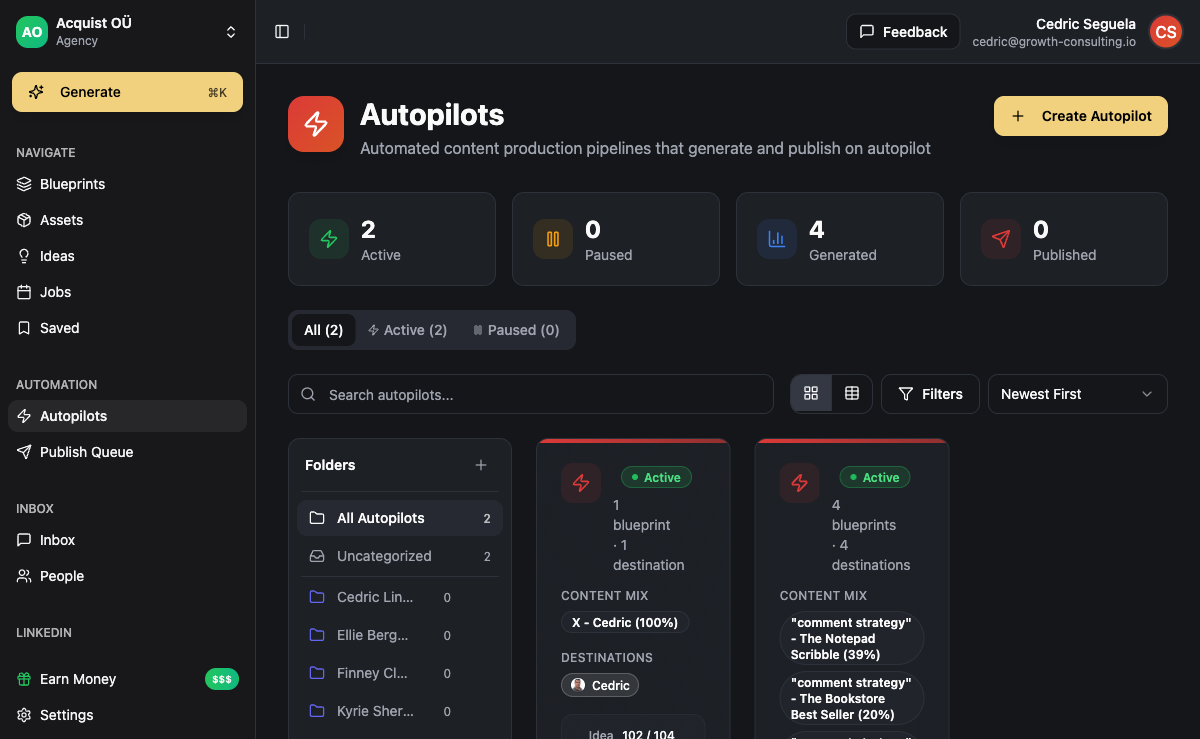
In Autopilots, create a new job. Assign the publishing channel, select the blueprint, set the posting frequency and time-of-day windows, and activate. ACA dispatches generation jobs on your defined schedule, routes finished content through your review queue if enabled, and publishes via Unipile at the scheduled time. Multiple autopilots run simultaneously with independent schedules - a LinkedIn autopilot posting three times per week, a Twitter thread autopilot running twice a week, an Instagram caption autopilot daily. Each runs against its own blueprint with no cross-contamination between clients or content types.
What the Automated Workflow Looks Like Day to Day
After activation, the operational routine changes from content production to content review.
Each morning at the scheduled generation window, ACA dispatches jobs from the active blueprints. Posts are generated from the brand voice and knowledge base, formatted for the channel, and placed in the review queue. With review enabled, you see the week's content in one batch - typically a Monday morning session for the coming week. Approve, flag for regeneration, or override with a manual edit. Only approved content enters the publish queue. Posts go live at the scheduled time via Unipile.
With review disabled, content flows directly from generation to the publish queue. This is a reasonable choice for mature brand voice configurations where output quality has been validated over several production cycles. Agencies typically start with review enabled and move high-performing clients to direct-publish after 3-4 weeks of consistent quality. The weekly operational overhead drops to one 20-30 minute review session per client per week - not per post, not per day.
Channels: Where ACA Posts on Your Behalf
ACA publishes to LinkedIn (personal profiles and company pages), Twitter/X (single tweets and threaded posts), Instagram (single image and carousel), Facebook pages, WhatsApp broadcast lists, and Telegram channels. For LinkedIn content combined with outreach in the same workflow, LinkedIn outreach automation covers how connection requests and content posts run from the same platform without switching tools or accounts.
Agencies managing content for multiple client brands use separate workspaces per client. Each workspace has its own Unipile account connections, brand voice, knowledge base, and blueprints. A client's Instagram account does not share configuration with another client's LinkedIn account. The isolation is structural. For teams combining social content with direct outbound campaigns, outbound sales automation runs alongside content autopilots in the same platform - the two channels compound. A prospect who has seen your content posts before receiving your connection request converts differently than a cold contact.
Who Social Media Autopilot Works Best For
Run social media on autopilot when: you manage content for 3-plus clients or brands simultaneously, content production is consuming more than 6 hours per week, or your posting consistency breaks whenever you get busy with other work. The ROI of setup time increases linearly with client volume. At 10 clients, the setup investment is trivially small relative to the weekly production time saved.
Stay manual when: you are responding to breaking news or a real-time event, engaging in a live conversation specific to today, or writing a post that requires context that cannot live in a knowledge base (a client result from this morning, a product announcement with embargoed details). Autopilots handle baseline volume. Manual posts handle the moments worth writing specifically for.
For agencies, the economics are direct. Content production at autopilot scale changes the margin structure of a social media service offering. An agency selling social content management at $2,000 per month and running it manually can spend a significant portion of that revenue on production labor. At autopilot scale, ongoing production time per client drops to review time - and the service becomes profitable to deliver rather than time-consuming to survive. AI content at agency scale covers the full production stack for teams managing high volume across multiple clients, including batch dispatch and multi-client blueprint libraries. For teams building the full AI content and outreach operation as a service, AI automation agencies package content autopilot alongside outbound as a single client deliverable.
Frequently Asked Questions
What is the difference between social media scheduling and social media autopilot?
Scheduling tools receive a post you wrote and manage when it goes live. Social media autopilot generates the post from your brand configuration and then schedules it. The distinction matters because scheduling leaves the writing problem unsolved - you still have to produce the input. ACA Autopilot closes that loop: the AI writes from your brand voice and knowledge base, the automation layer formats and publishes. Most tools marketed as "social media automation" are schedulers. A content autopilot requires a generation layer, not just a publishing layer.
How long does ACA Autopilot take to set up?
Initial setup for one account or client takes 60-90 minutes: connecting social accounts (10-15 minutes), creating a brand voice with example posts (20-30 minutes), building a basic knowledge base (15-20 minutes), and configuring blueprints per content type (15-20 minutes each). Activating the autopilot is a few clicks after that. A second client follows the same steps with their own brand configuration. The setup investment does not repeat per post - only per new client or new content type you want to produce.
Can I review content before it posts automatically?
Yes. Review is a configurable step in the Autopilot setup. When enabled, generated content goes into a review queue where you approve, edit, or flag for regeneration before it enters the publish queue. When disabled, content flows directly from generation to the publish queue. Most agencies run review-enabled for new client accounts and shift to direct-publish after the brand voice configuration has proven reliable over several production cycles. The review step typically adds a single 20-30 minute weekly batch session to the workflow - not a per-post review commitment.
Does ACA Autopilot work for personal brand accounts, not just company pages?
Yes. Personal brand accounts require more detailed voice configuration than company page accounts - characteristic vocabulary, sentence rhythm, the opinions this specific person is known for, and the topics they cover. Generic voice profiles produce content that sounds like a brand, not a person. Plan for 12-15 sample posts as voice reference input instead of the 5-8 you might use for a company page. With that level of configuration, the output quality for personal brand accounts is consistent enough for practitioners who want to maintain a credible content presence without writing every post themselves.
What happens if the AI generates an off-brand post?
Flag it for regeneration from the review queue - ACA runs another generation pass with the same blueprint. Persistent off-brand output is a signal that the brand voice needs more specific example posts or the knowledge base needs more context on the topic in question. Generic knowledge bases produce generic output regardless of which model runs the generation. The fix is refining the configuration, not regenerating indefinitely with the same inputs. A well-configured voice profile plus a topic-specific knowledge base produces on-brand content reliably from the first pass. The revision rate drops significantly once both are set up correctly.